Never Use Fast
Premium Fast mode is a latency product, and agent work is almost never latency-bound. Do not confuse the expensive priority lane with the cheaper Flash-style models that made fast synonymous with efficient.


Maximize Value, Not Intelligence is the argument: route to the cheapest model that clears your bar, and make the expensive tier opt-in. This is the settings version — the buttons that implement it, and the one button that quietly undoes it.
Start with the button. In Cursor and a growing number of AI tools, capital-F Fast is a premium option applied to a model you have already chosen. In at least one popular tool it is the default. Turn it off, then make the exceptions earn their way back in.
“Fast” changed meanings
The name is confusing because fast used to describe the economical choice.
Google introduced Gemini 1.5 Flash in 2024 as a lighter-weight model than Gemini 1.5 Pro, built in response to demand for lower latency and a lower cost to serve. That meaning has not disappeared. Google still describes Gemini Flash-Lite as its fastest and most cost-effective model. Pick a cheaper model that also happens to be fast and you are optimizing in two useful directions at once.
But Fast has acquired a second meaning: not a different model, but a priority lane for the model you already picked. Cursor described the faster version of Composer 2 as offering “the same intelligence” at a higher token price, then made that version the default. OpenAI made the terminology shift explicit in July 2026 when it renamed Priority processing “Fast mode”.
That second meaning is what this article is about. Do not avoid economical Flash-style models. Avoid paying a premium merely to receive the same work sooner when nobody is waiting for it.
What Fast actually sells you
Once you have chosen the model, a Fast service tier does not make it smarter. It buys priority capacity or a nearer place in the queue. The thing it changes is how long you wait.
Priced honestly, too. Cursor currently charges six times Composer 2.5's standard token rates for Fast and twice Grok 4.6's. OpenAI advertises up to 2.5× faster output and bills the tokens at a premium. Read as a raw trade, buying speed may be perfectly rational.
It is a good deal on the wrong axis. Fast converts tokens into lower latency, and latency only costs you something when a person is sitting there waiting. For a coding agent grinding through a migration for eleven minutes, the wait is not a cost. It is a window in which you are doing something else.
The substitute is free. Throughput is tasks in flight divided by time per task, and Fast only touches the denominator — at a premium. A second session raises the numerator at no premium at all. Pay double to finish one task in 40% of the time, or start a second task at list price and finish two in the wall-clock you already had. Fast wins only when you genuinely cannot start the second task.
Which is why this is a rule and not a preference. The situations where you cannot start a second task are rare, specific, and easy to name — so name them, and treat everything else as the default:
Buy Fast when a human is blocked and the wait is the actual expense. Live pairing where a teammate is watching the cursor. A production incident where minutes have a dollar value. A demo. That is the list. In each case someone's attention is metered at far more than a 2× token multiple, and the arithmetic flips cleanly.
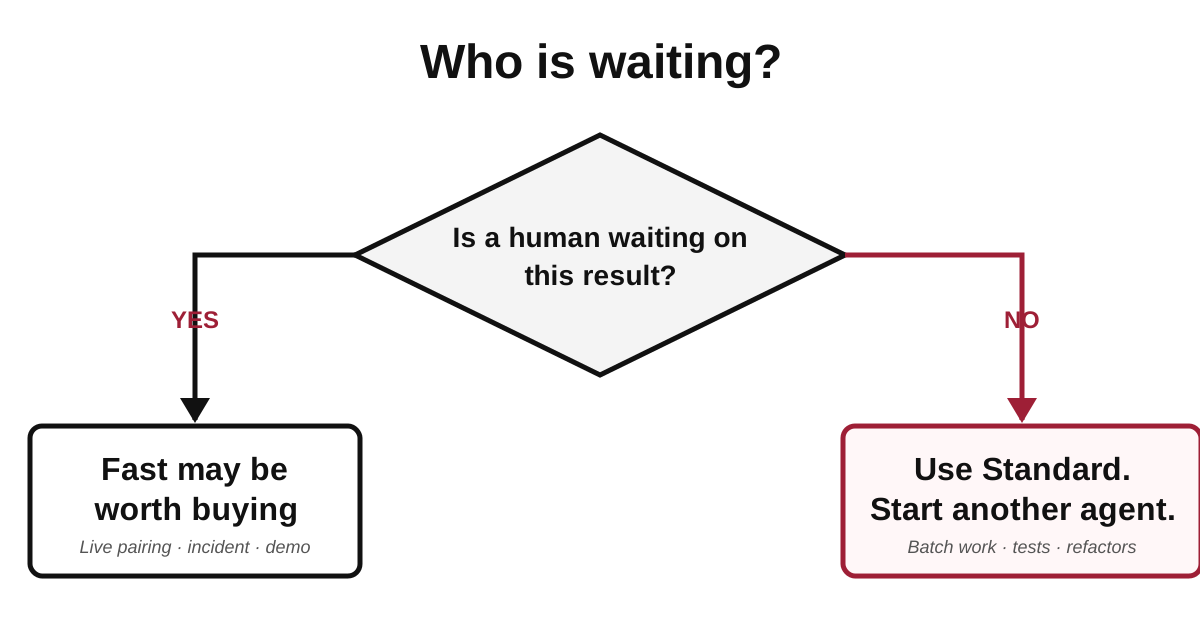
The decision is not “do I prefer speed?” It is “whose attention becomes available sooner?”
Everything else on your queue — the test backfill, the dependency sweep, the docs that drifted, the overnight refactor — is work you will read later. Buying its latency down accomplishes nothing except moving the moment you have to review it, and your review capacity is the binding constraint anyway.
The Fast tax, checked 2026-08-29
Every number here rots. The structure underneath it does not.
| Model / tool | Standard (in / out per 1M) | Fast (in / out per 1M) | Price multiple | Published speed gain |
|---|---|---|---|---|
| Composer 2.5 (Cursor) | $0.50 / $2.50 | $3.00 / $15.00 | 6× | none published |
| Grok 4.6 (Cursor) | $2.00 / $6.00 | $4.00 / $12.00 | 2× | none published |
| Claude Opus 5 | $5 / $25 | $10 / $50 | 2× | up to 2.5× output tok/s |
| GPT-5.6 (any tier) | list rate | 2× list rate | 2× | up to 2.5× |
| GPT-5.6 Sol Ultrafast | — | limited preview, no rate card | unpublished | up to 14×, ~750 tok/s |
Verified August 29, 2026 against Cursor's models and pricing page, BenchLM's Anthropic API pricing table, and AI Pricing Guru's OpenAI page. Standard list prices for Sol disagree across sources this week — I have deliberately left absolute flagship prices out of this table, because the multiple is the durable number and the list price is not.
Two things fall out of that table.
The Composer row is the one to look at hardest. Six times the price on both axes, and no published throughput figure to divide it by. You cannot compute a value ratio for a speed gain nobody has quantified, and a vendor that has not published the number is not usually sitting on a flattering one.
The Opus row has a sting in it. Fast-mode Opus 5 lands at $10 / $50 per million — which is exactly Claude Fable 5's standard rate. Pay the flagship-plus price, receive the model you already had, faster. Meanwhile Opus 5 scores within half a percent of Fable 5 on CursorBench at half the cost per task, which is a good reminder that the premium tier and the fast tier are increasingly the same product wearing two labels.
The Ultrafast row is not a recommendation either way. It is a limited preview with no published rate, quota, or service term, which means you cannot evaluate it. Do not put an unpriced tier in a budget.
The defaults that turn it on for you
"Never use Fast" would be trivial advice if Fast were something you had to go find. Mostly it is something you have to go turn off.
A pinned model and a Fast toggle look like personal preferences. They're workplace controls — defaults the team owns, not soft settings you rediscover chat by chat. Own those defaults on purpose or the vendor's factory preset keeps winning.
| Tool | The default that costs you | What to do instead |
|---|---|---|
| Cursor / Composer 2.5 | The Fast toggle ships on, and a selection-persistence bug has reverted it to Fast on new chats | Settings → Models → Composer 2.5, set the Standard variant; glance at the model chip before long runs |
| Cursor / Auto | All Auto modes bill at the list price of whichever model they route to | Pin one model yourself — Composer 2.5 or Luna for the bulk of the work |
| Codex | The bare gpt-5.6 alias routes to Sol, the flagship tier |
Name the tier explicitly: gpt-5.6-luna for routine work, Sol only when you mean it |
| Claude | Reaching for Fable 5 out of habit | Opus 5 at half the price, within 0.5% on CursorBench; keep fast mode off |
| Any tool, any vendor | "Priority," "turbo," "ultrafast," "boost" | Assume it is a latency product until the pricing page says otherwise |
Checked August 29, 2026. Cursor's Auto billing has already moved once this month — as recently as mid-August, Auto Cost was documented as a flat rate and the $0.25/M Cursor Token Rate applied more broadly than it does now. That is the whole reason these live in a table.
One more Codex-specific date worth acting on: gpt-5.4 and gpt-5.4-mini retire from Codex with ChatGPT sign-in on August 31, 2026. If either is in a config file, it stops being a cheap default and starts being an error in two days.
The manager-and-workers version
Turning Fast off is what makes a second model tier affordable, and that is where the savings actually get spent.
The pattern that has been working: Grok 4.6 as the manager for a parallel team of Composer 2.5 agents. Grok plans, splits the work, reviews what comes back, and rejects what does not meet the spec. Composer does the implementation. Other models drop into the mix when the task earns them.
The economics only work with Fast off. Grok 4.6 costs about 2.4× Composer 2.5 on output, and a manager burns more tokens than a worker does — it re-reads the plan, the diffs, and the failures. Multiply that by a 2× fast premium on the manager and a 6× premium on every worker and the management layer stops being a rounding error. Off, it is one of the cheapest ways to buy competent supervision of a coding agent.
One operational note that costs real money if you skip it: say in the plan that implementation runs on Composer 2.5 sub-agents. Say it before you approve. If you click through to implement without that written down, the manager will not put it there on your behalf, and you will get an expensive model doing work a cheap one was going to do. More on the shape of that setup in Grok Bot Gave My Coding Agents a Boss.
Empty every bucket
The other half of not overpaying is not underusing. Subscriptions are not one pile of tokens — they are several pools that expire separately, and unused quota has no salvage value.
| Service | Separate pools | Reset |
|---|---|---|
| Antigravity (Google AI Pro) | "Gemini Models" and "Claude and GPT models" — independent counters | Weekly limit, with a five-hour rolling refresh underneath it |
| Cursor | "Cursor Models" (Grok, Composer) and "Other Models" (third-party) | Both reset with your monthly billing cycle |
| Grok Bot (included on paid Cursor plans) | Its own included usage, separate from the two Cursor pools | Weekly; overflow spills to on-demand spend if enabled |
Verified August 29, 2026 against Antigravity's models docs, Cursor's models and pricing page, and Cursor's Grok Bot plans page.
Correcting myself on that last row: I have said in a draft elsewhere that Grok Bot quota is calendar-month aligned. Cursor's own documentation says it resets weekly, and that Grok Bot is included on every paid individual plan plus Teams and Enterprise. Weekly is the number to plan against — a heavy Tuesday can push you onto on-demand pricing for the rest of the week, and Monday's unused allowance is simply gone.
Three services, three different reset cycles, none of them aligned. That is the practical consequence: the pool that is about to reset is the cheapest compute you will ever have, because its marginal cost is zero and its salvage value is zero. Scheduling matters about as much as model choice. If you are on Google AI Pro and only ever prompt Gemini, you are leaving an entire Claude-and-GPT counter on the table every week for no reason beyond habit.
If someone else is watching the bill
The corporate version of this is a procurement default rather than a checkbox. A standard developer image ships with the latest model, Auto routing, and Fast enabled, because those are the settings that generate the fewest support tickets in week one. Nobody revisits it, and it compounds across every seat.
The question to ask in that room is narrow enough to actually get answered: what did the fast premium buy us? If the answer is "our agents finish overnight batch jobs sooner," there is no answer — nobody was waiting. Set the org default to the standard variant, keep Fast available for on-call and live pairing, and let people opt in when they can say who was blocked.
What to re-check
The multipliers in this article are current as of August 29, 2026 and will move. The reasoning will not:
- Fast is a latency product. Before buying it, name the person who is waiting.
- If you cannot name one, buy concurrency instead. It is the same throughput at list price.
- Any setting that picks a model or a service tier for you can pick an expensive one. Read what it is optimizing for.
- Quota that expires unused was free capability you declined.
Re-read the vendor pricing pages quarterly, or the first time a bill surprises you. Everything above the tables should still hold; the tables will not.
Companion pieces
- Maximize Value, Not Intelligence — the argument these settings implement: route to the cheapest model that clears the bar, and measure what you actually spend per accepted change.
- The Year Coding Became a Commodity — why the fast tier inverted in the first place, from cheap-and-small in 2025 to premium-and-quick in 2026.